Overview
2016-09-14 – macOS Sierra note: The patch works in macOS Sierra, but it seems that Xcode Developer Tools might not upgrade properly in some cases. If you experience any issues with code signature, try reinstalling Xcode tools (xcode-select --install) and then patch again. See this github issue for details.
This is a patch for removing the default OS X behavior of always starting iTunes when the play button on the keyboard is pressed. This feature can be useful for a lot of users, but it can also be annoying if you are using VLC, Nightingale or other similar programs that support the media keys.
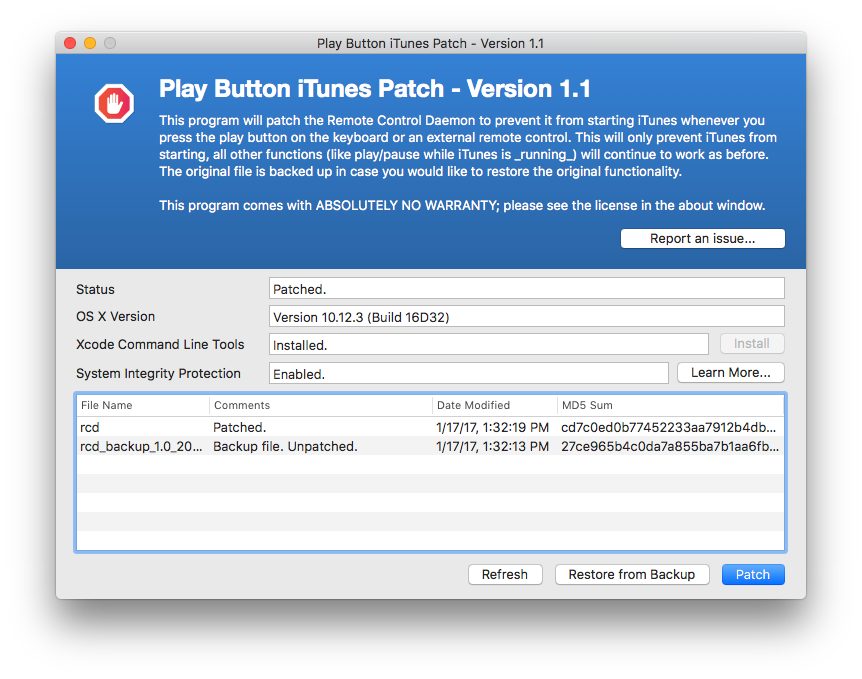
The application will patch the Remote Control Daemon to prevent it from starting iTunes whenever you press the play button on the keyboard or an external remote control. This will only prevent iTunes from starting, all other functions (like play/pause while iTunes is running) will continue to work as before. The original file is backed up in case you would like to restore the original functionality.
You can find the source code on github.
OS Support & End of Life
Please note that this patch does not work on macOS High Sierra and later versions. Based on my research it seems that macOS now has good support to address the issue that this project was initially intended for so most of the modern media players now are able to support media keys natively. Given this, and my low availability lately, I am considering archiving this project. Please see this issue for the current status. I am open to accepting pull requests and new maintainers.
OS X El Capitan, macOS Sierra Compatibility
This patch works by modifying a system file (rcd). With the new System Integrity Protection (SIP) functionality introduced in El Capitan you have to take additional steps to temporarily disable SIP. Hopefully I will get some time soon to update the binary to guide through this, but for now here is what you have to do.
- Boot into recovery
- Launch terminal once booted into recovery: Utilities menu > Terminal
- Disable SIP:
csrutil disable - Restart and log in as you would normally. Validate that SIP is disabled by running the following command in terminal:
csrutil statusIt should say disabled. - Run the iTunes Patch dmg and continue with the patching.
- Once the GUI shows that it has successfully patched, boot back into recovery to re-enable SIP.
- Launch terminal once booted into recovery: Utilities menu > Terminal
- Re-enable SIP:
csrutil enable - Restart. The patch should be applied now without disabling SIP forever.
Reporting Issues
Please click the “Report an issue…” button in the application and it will present the option for submitting issues. You can always contact me directly as well.
Updates
2015-03-02 farhan: Published the GUI app (version 1.0). The command line patch is still available in the download section.
2014-12-21 farhan: I am almost done with a new GUI based app. Please see the download section below for details.
2013-05-11 farhan: Updated to 0.8.2. Added step to self-sign the modified binary. This should prevent rcd from crashing on Mountain Lion. Thanks to user48986 at AskDifferent .
2016-09-14 farhan: Confirmed that the GUI app works in macOS Sierra.
Download
Play Button iTunes Patch-v1.1.zip
Download – Older Text-based Patch
This is no longer recommended, but I am still leaving it around in case if someone needs it. After downloading double click on Patch.command and follow the prompt.
License
Copyright (C) 2010 Farhan Ahmad.

This program is free software; you can redistribute it and/or modify it
under the terms of the GNU General Public License as published by the
Free Software Foundation; version 2 of the License.

This program is distributed in the hope that it will be useful, but
WITHOUT ANY WARRANTY; without even the implied warranty of
MERCHANTABILITY or FITNESS FOR A PARTICULAR PURPOSE. See the GNU
General Public License for more details.