I have mostly embraced Large Language Models (LLM)/AI for a lot of things, but music, and more specifically songs with lyrics, is one place where I am actively trying to stay away from AI. In this post I want to explain my thinking and why I wish music platforms would make it very obvious when they suggest AI generated music. Not only that, the platforms should let you actively filter AI generated music.
Read full post… “Please Let Me Filter Out AI/LLM Generated Music”Blog
During the course of the day I encounter lots of challenges, some of which take minutes to solve and others that take much longer. My goal for this section is to keep track of these challenges and their solutions. I will turn the longer ones into articles, while the shorter ones will stay as blog entries. You can expect topics to range from very specific programming challenges to broader topics like life.
Below is a list of the recent blog entries. You can also browse the blog by using the tags on the right side, or if you know what you are looking for then you can use the search box at the top right.
PaperMETAR – Coming Soon!
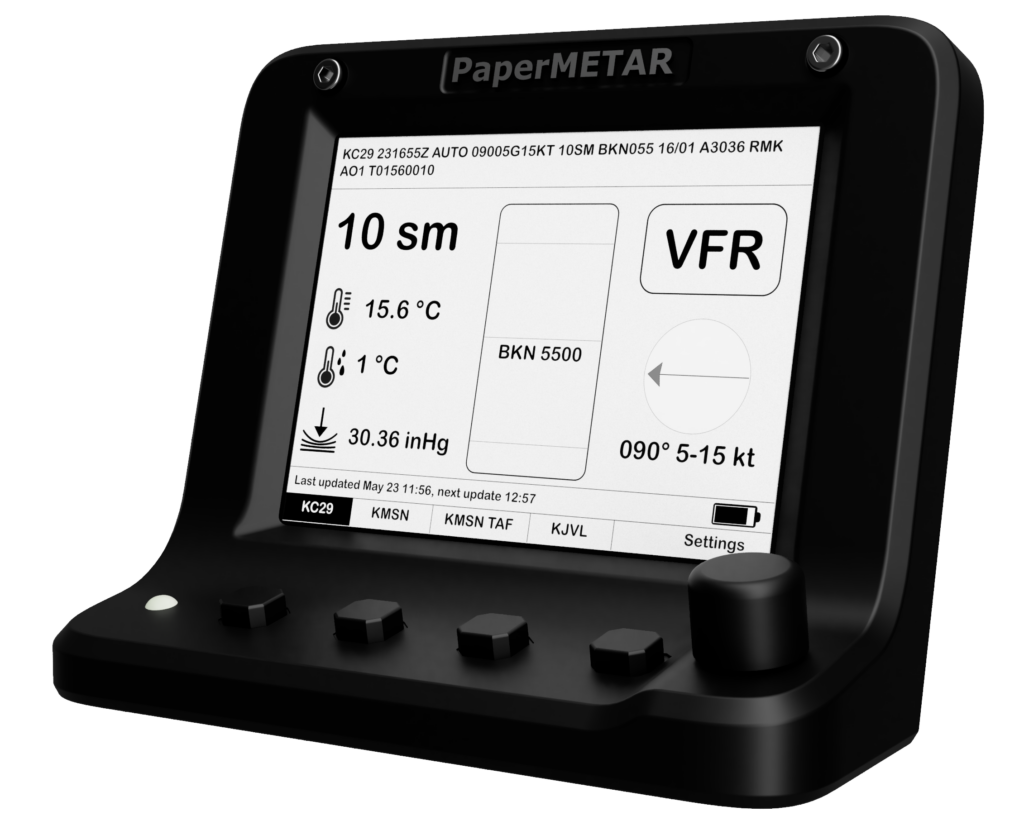
Lately I have been working on an aviation weather device I call PaperMETAR. It’s a desk accessory geared towards piltos and aviation enthusiasts. I am excited to announce that I am launching it on Kickstarter this coming Tuesday, January 13! You can see more at PaperMETAR.
Please follow the journey along on the PaperMETAR website.
How Not to Make Your Customers Lose Trust in Your Product
I have been using Microsoft’s OneDrive service for a while. I am a macOS user and their macOS sync client wasn’t the best at first, but they mostly caught up over time. Unfortunately, they recently took a major step back as part of their “V2” upgrade that is making me rethink OneDrive.
Read full post… “How Not to Make Your Customers Lose Trust in Your Product”iPhone Mirroring Not Working?

I recently upgraded to a macOS 15 and was excited to use iPhone Mirroring. Then the macOS 15.1 betas started coming out and I was too excited to not give Apple Intelligence a try. Unfortunately, the upgrade broke iPhone Mirroring for me. After fifteen minutes to looking, I finally found a solution that worked for me.
Read full post… “iPhone Mirroring Not Working?”Designing for Health: Interview with Farhan Ahmad and Jon Keevil, MD [Podcast]
Dr. Jon Keevil and I had the privilege to talk to Dr. Craig Joseph on the Nordic In Network podcast about the journey of our last company, HealthDecision. Check it out!
Designing for Health: Interview with Farhan Ahmad and Jon Keevil, MD [Podcast] (nordicglobal.com)

WARNING: Ignoring invalid distribution -ycparser in PlatformIO
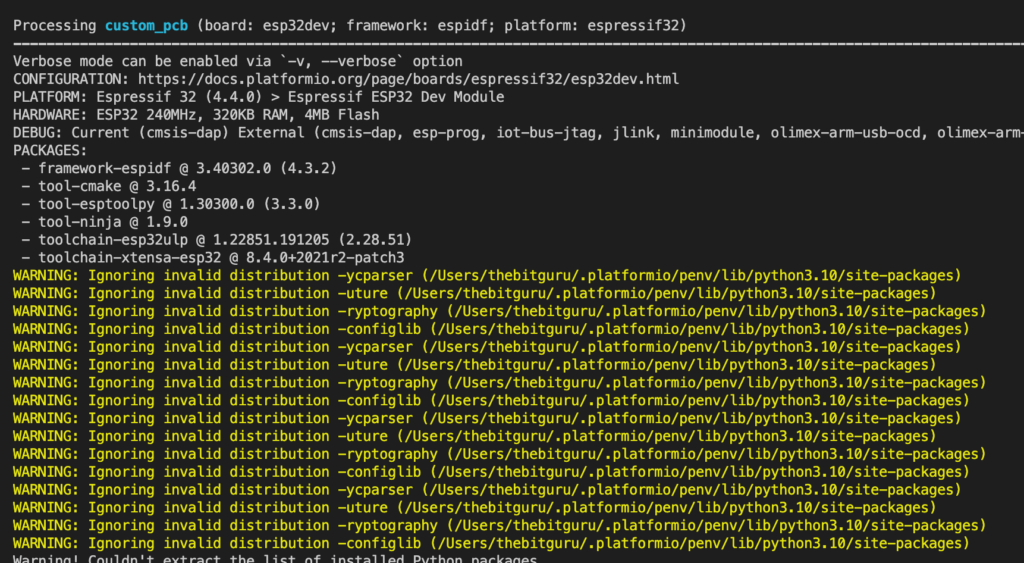
Lately, I have been working on an ESP32 firmware using PlatformIO. I went with PlatformIO because it works quite nicely within my familiar Visual Studio Code environment. PlatformIO worked well for a few weeks until recently, when I started seeing the following errors.
WARNING: Ignoring invalid distribution -ycparser (/Users/thebitguru/.platformio/penv/lib/python3.10/site-packages)
WARNING: Ignoring invalid distribution -uture (/Users/thebitguru/.platformio/penv/lib/python3.10/site-packages)
WARNING: Ignoring invalid distribution -ryptography (/Users/thebitguru/.platformio/penv/lib/python3.10/site-packages)
WARNING: Ignoring invalid distribution -configlib (/Users/thebitguru/.platformio/penv/lib/python3.10/site-packages)
WARNING: Ignoring invalid distribution -ycparser (/Users/thebitguru/.platformio/penv/lib/python3.10/site-packages)
WARNING: Ignoring invalid distribution -uture (/Users/thebitguru/.platformio/penv/lib/python3.10/site-packages)
WARNING: Ignoring invalid distribution -ycparser (/Users/thebitguru/.platformio/penv/lib/python3.10/site-packages)
...
I haven’t touched Python in a while, so I wasn’t sure what was going on here. A quick Google search for these warnings with “PlatformIO” didn’t turn up anything. So, I had to dig deeper and search for general Python and PIP errors.
After a little searching, I found out that apparently pip leaves old package directories around if something goes wrong, and never cleans them up. These folders then result in these warnings. As suggested in the linked page, the solution was to delete all the directories starting with a tilde (~). Pip will then reinstall the missing packages as needed and the warnings will go away.
I can finally have a cleaner build output again! Now only if I can get the esp32_exception_decoder monitor filter to work again…
Logging Solo Cross Country Flights in ForeFlight
I have recently been training for my private pilot license. After learning the basics, I really enjoy using ForeFlight for tracking and planning. ForeFlight also makes it easy to track my progress towards the license. One of the requirements is to do a solo cross-country flight. When it came time to log my entry in ForeFlight, I couldn’t figure out how to do it initially. I finally figured it out and this blog post shows how to do it.
Read full post… “Logging Solo Cross Country Flights in ForeFlight”Hiveon Pool Not Connecting?
I have recently started playing around with Hive OS. The miner kept failing to connect with the default setting in Hive OS portal. Sometimes it would say things like “Connection Remotely Closed by usw-eth.hiveon.net” and after some tinkering, it started giving some generic errors like “Operation canceled.”

Microsoft Flight Simulator 2020 – Mandatory Update Required

I have recently been training for my private pilot license. As part of the whole experience, I also setup a simple flight simulator using Microsoft Flight Simulator 2020. It has been a good supplement for my training, definitely not the same experience, but it can help with better understanding VOR navigation and other similar concepts. I haven’t run the simulator in about a month and a half, and when I started it up I got an error message saying that there was some mandatory update that I needed to install from the Microsoft Store. Going to the store didn’t show any updates so I had to do some digging to figure our what was going on.
Read full post… “Microsoft Flight Simulator 2020 – Mandatory Update Required”Firmware Upload to ESP32 Failing Intermittently

I have recently been playing around with a side project that uses the ESP32 SOC/microcontroller, the Adafruit Huzzah32 flavor specifically. I am controlling a motor with it and use a ULN2003 to drive it. I noticed that when I connected the driver, I couldn’t upload a new firmware to it. After doing some troubleshooting and research, I learned that my pins were the issue.
Specifically, GPIO PIN #12 was the issue for me. It’s one of the strapping pins used for the different boot modes. I am sure there are ways to address this, but I ended up switching to a different and now I can upload firmware as needed.
Here is a link to the ESP32 datasheet for anyone interested in seeing more details.